Tableify AI Event Manager for restaurants
Meet Nora. She answers party inquiries from your real rooms, minimums and calendar, says plainly what she will not decide, and hands each lead to your team.
The planner writes at noon. Your managers are running lunch.
Party inquiries land in the middle of service, and the first reply that actually answers the question is usually the one a planner keeps talking to.
Lunch rush, unread messages
A question about a Sunday shower arrives at 12:40pm on a Friday, while every manager is expediting tickets.
Answers live in heads
Which room fits 25, what the minimum is, whether the 14th is free: one manager knows, and that manager is on the floor.
Rushed replies cost more
A hurried answer that quotes the wrong minimum or promises a taken date does more harm than a slow one.
Planners ask an assistant for a shortlist, then message every name on it.
The places named all get the same note within minutes. The one that answers with a room that fits, a real minimum and an open date keeps the conversation.
- 1.The bistro with the glass garden roomSeats 30 for brunch, set menus available.
- 2.The bakery cafe on Elm StreetBack room for 24, private on weekend mornings.
- 3.The hotel lounge downtownEvent room for 40 with brunch packages.
What Nora knows before a planner writes
An AI event manager is only as good as the facts behind it. Nora starts from what your restaurant has already published: each room with its capacity and its own Book Now or Inquire link, the live menu, the events on your calendar, and any deposits, minimums, per-person prices and cancellation terms you chose to show for a room. She can also see which dates a room already has bookings on. She never sees, and never says, whose bookings they are.
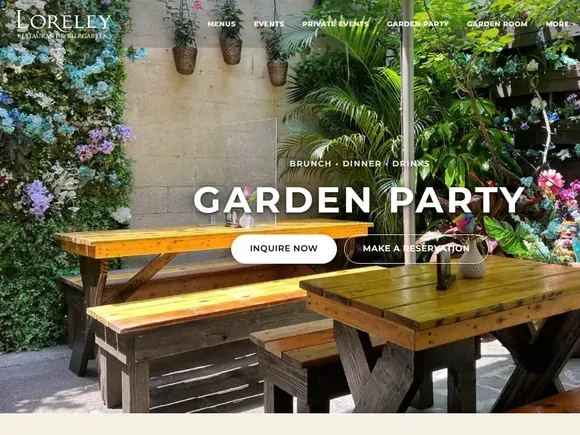
At Loreley Beer Garden on New York's Lower East Side, where Nora has answered party inquiries since May 2026, those facts are three spaces with published sizes. The Loreley case study shows the rest of that setup.
On top of the published pages comes whatever you teach her: up to 200 questions with your answers, 20 documents such as an event packet or a party menu, and 50 public links. Where your written rules and her defaults disagree, yours win.
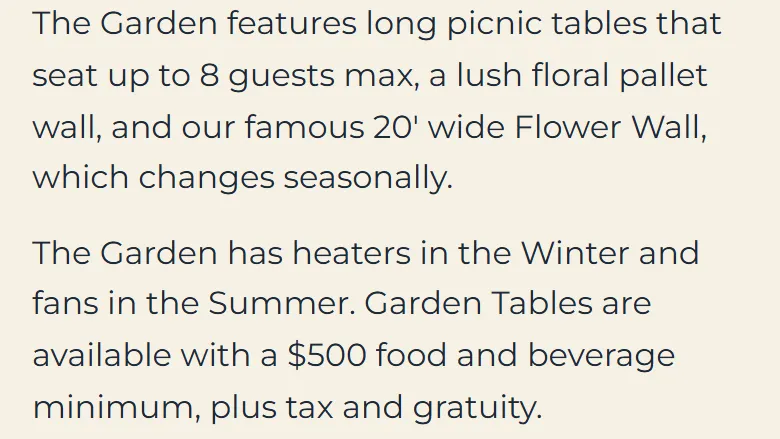
- The Garden Party: long picnic tables that seat up to 8 guests each, with heaters in winter and fans in summer.
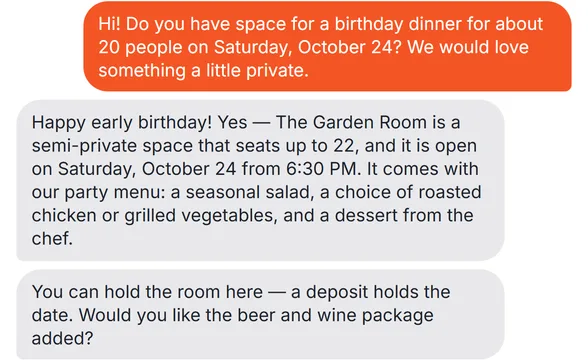
- The Garden Room: the indoor garden room, seating up to 22.
- The Party Room and Lounge: up to 65 guests, with lounge seating and a private bar of its own.
One planner, six questions, during the lunch rush
Here is how one conversation runs, built on the beer garden's published facts. The planner and the messages are an example, not a transcript. It is 12:41pm on a Friday and every manager is on the floor for lunch when an Instagram message arrives: a baby shower for 25, a Sunday afternoon three weeks out, somewhere with a little privacy.
Question one is fit, and Nora does not stretch a room to make a sale. The Garden Room seats up to 22, so she says it runs a little small for 25 and offers the two spaces that do fit: a few picnic tables in the Garden Party, at up to 8 guests a table, or the Party Room and Lounge, which holds up to 65. She shares the Inquire link for each, because each room books through its own page on the restaurant's website.
The planner likes the garden and asks whether it gets cold in the fall. The Garden Party page says the garden has heaters in winter and fans in summer, so that is what Nora says, and nothing more.
Question two: the minimum, word for word
Next the planner asks whether the garden has a minimum. The beer garden publishes one on its Garden Party page: garden tables come with a $500 food and beverage minimum, plus tax and gratuity. Nora gives the planner exactly that. She does not work out what several tables would come to, round the figure, or add conditions the page never states.
That restraint is the whole point. A minimum quoted wrong in a chat turns into an argument at the deposit. When the published line is all a planner hears from Nora, the number your manager confirms later matches what the guest already read. If a room has no published pricing at all, she says the team will share it and moves on to the next question.
Questions three and four: a date and a discount
Question three is the date. Nora checks which dates the garden already has bookings on and tells the planner that Sunday looks open. She does not hold it and does not confirm it; she says plainly that the team confirms every booking. Had the date been taken, she would have said so without a word about whose party it was.
Question four is the one every manager knows: could you go lower on the minimum, since it is a Sunday afternoon? Nora does not haggle and does not invent a discount. She says the final quote comes from the team. A planner hesitating over price is also one of the moments that sends your team an alert by email or text, with a one-line summary such as a shower for 25 asking about the garden minimum. Each lead raises that alert at most once in six hours, so a long chat never buzzes a manager again and again during service.
Type your restaurant's name. The free report shows how you come up on Google and in AI answers, next to the places near you.
Questions five and six: a card number and a person
Question five arrives as a string of digits. Keen to lock the date, the planner types a card number into the chat. Nora never asks for card details and never repeats them. A typed card number is hidden before anyone on your team sees it, and she explains kindly why a chat is not the place for it. The deposit is something the planner settles with your team.
Question six comes right after: wait, am I talking to a real person? Nora answers honestly. She is the restaurant's virtual assistant, she speaks for the restaurant as we, and she offers to bring someone from the team in. She never claims to be staff. A question about a refund would get an equally fixed answer: Nora never refunds and never promises one, and the guest hears that our team will be in touch shortly.
The handoff note, and the pause that follows
All along, Nora has been saving details on the lead as they come in: a name, then a phone number, then an email, then the headcount, date, time and room, asked one at a time and never twice if the planner skips one. If the shower shrinks from 25 to 20 in a later message, the lead says 20. Once the chat has been quiet for five minutes, she writes one short handoff note: the occasion, the garden, the reaction to the minimum, the request for a lower price, and the hidden card number.
At 2:20pm lunch winds down. The manager opens the lead in Tableify CRM, reads the note and writes to the planner directly. From that reply, Nora steps out of the conversation for as long as the channel is set to: 30 minutes for Instagram, Facebook and website chat out of the box, two hours for texts, or anything up to a full day, or until someone hands it back.
Two more controls sit behind that. A reply on any channel can pause every channel for that guest, and you can pick a pipeline stage past which Nora never writes to a lead again, while your team gets a single Your turn alert.
Four channels, each with its own switch
Nora works the chat on your website, text messages, Instagram messages and Facebook Messenger. Texts, Instagram and Facebook each have three settings: off, where messages still reach your team; drafts, where Nora writes the reply and a person decides whether to send it; and answering. Website chat has a switch of its own, and one button turns every channel off at once. Texts begin once your restaurant's own texting number is approved.
Each channel shapes the conversation. Website chat collects the guest's name, email, phone and party size before the first message, so Nora greets them by first name and skips those questions. Instagram and Facebook arrive with only a profile name, which is why the lunch-rush planner above was asked for contact details one by one. A photo or a voice note she cannot open gets a warm request to type it out. Phone calls still go to your staff.
Messages that are not parties, and where to start
An inbox that answers parties also hears from everyone else. Nora sorts three kinds of sender who are not guests: creators, influencers and press; vendors and sales pitches; and job seekers. For each you write what she should say and where to send them, such as an email for media kits or your careers page. Leave one blank and she thanks them, says the team handles these directly, and takes their name, contact and proposal.
A sensible way to start is narrow: drafts on Instagram for a week, then answering on website chat, then texts once the team has read enough of her replies. Nora sits inside the larger events setup on the private event software page, beside the other specialists on the AI staff page, and her party leads sit beside reservations on your own site for regular tables. If you are still weighing how much of the first conversation to hand over, the fit checklist is a fair place to start.
From your room pages to her first answer.
Nothing books, posts, sends or spends without your say-so. You decide how much of the first conversation Nora takes.
Publish the facts
Rooms with capacities, minimums you are happy to show, the menu and the events calendar. Those pages are what she quotes.
Teach the exceptions
Add the answers your best host gives on the phone, plus event packets and links. Your rules beat her defaults.
Switch on one channel
Begin with drafts on one channel, move it to answering when you trust her, and add the next.
What Nora answers from
The published pages behind the conversation above, from one New York beer garden, and a demo of a first reply.
Questions about an AI event manager
What is an AI event manager for a restaurant?
It is an AI assistant that gives the first reply to private event inquiries, from your real rooms, menus and published prices. It gathers what your team needs, such as the date, headcount and room, and alerts the team when a guest looks ready. Quotes, agreements and confirmations stay with people. At Tableify that assistant is Nora.
How quickly does Nora reply to a party inquiry?
On a channel set to answering, she writes back without waiting for anyone on your team to be free. At the beer garden in our case study, her median first reply was 4 minutes in every month measured, July through September 2026. On a channel set to drafts, a person sends each reply, so the timing is theirs.
Can Nora quote a minimum or confirm a booking?
She quotes the deposits, minimums, per-person prices and cancellation terms you published for a room, as written. She can tell a guest that a date looks open, without saying who booked the others. She does not write custom quotes, offer discounts or confirm a booking; your team does those.
What does Nora do if a guest types a card number?
The number is hidden before anyone on your team sees it, and she never repeats it. She explains kindly that a chat is not the place for card details. Nora never asks for payment details herself, and the deposit is arranged with your team.
Will guests know they are talking to an AI?
Yes, whenever it matters. Nora speaks for the restaurant as we, but she never claims to be a person or a member of staff. If a guest asks, she says she is the restaurant's virtual assistant and offers to bring someone in.
What happens when my team wants to take over?
Reply to the guest. Nora pauses on that conversation for the time set for that channel, from 30 minutes to a full day, or until you hand it back, and a reply anywhere can pause every channel for that guest. You can also pick a pipeline stage after which she never messages a lead again. Every conversation sits on its lead in Tableify CRM.
Is Nora included in my Tableify plan?
Nora comes with every full Tableify website plan, and she is an add-on for restaurants on a Smart Site. There is no commission on any party she helps you book. A short call shows which plan fits how many inquiries you get and where they arrive.
How do planners find my restaurant in the first place?
Nora answers the planners who reach you; getting on their shortlist depends on your pages. Give each room its own page with its capacity, photos and the occasions it suits, and keep the menu and hours in plain text. The guide to showing up in AI answers walks through it, and the restaurant SEO guide covers search engines.
Give Nora the first reply.
See which places an AI assistant names when a planner near you asks for a private room, and whether yours is one. Free.