Checklist · 10 min read
Restaurant website checklist: the first ten seconds
Pick up your phone, open your own site and start counting. Here is what a guest looks for before they decide to stay, and how to score yours.
The short answer
A restaurant website passes when a guest on a phone can find six things within about ten seconds: today's hours, the menu as text, a button to book, an address that opens a map, a page for each room you rent with a form, and a way to buy a gift card. Everything else on the site comes after those.
- Test it on a phone, away from your Wi-Fi.
- The menu as text with prices, never only a PDF.
- Your Google listing's links should open the same pages.
At a glance
- Where to test
- A phone, away from your Wi-Fi
- What guests look for first
- Hours, the menu, a way to book
- Menu format
- Text on the page, not a file
- Address
- Text that opens a map when tapped
- Rooms you rent
- One page and one form each
- Google listing links
- Menu, booking and ordering, on your site
The first ten seconds
A guest decides in the first few taps.
Many visits start on a phone, from a search result or a map listing, with one question in mind. The site either answers it on the first screen or loses the guest to the next place.
Hours
Open now, or not?
Today's hours written as text near the top. Hours inside a photo or buried in the footer are hours a guest never finds.
Menu
A menu you can read
Dishes and prices written on the page. A PDF that downloads, or a photo of the printed card, makes a phone user pinch, then leave.
Book
One tap to a table
A booking button on the first screen that opens a time picker, not a contact form, and not a phone number during service.
The question a guest brings to your site
Guests often ask an assistant or a search box first, then open the site to check. Your first screen has to answer the same question: the brunch menu, Saturday's hours and a way to book. Being named in the first place is covered in the guide to AI answers.
Asked an AI assistantYou don't appear
Where can I see the menu and book Saturday brunch near me?
- 1.The cafe on Linden StreetBrunch menu on its site, tables for Saturday bookable online.
- 2.The diner by the train stationWeekend brunch from nine, bookings and walk-ins.
- 3.The bistro on the squareA set brunch menu and a booking page on its site.
Your restaurant: not mentioned
Side by side
Six checks, three common setups.
How three ways of running a restaurant site do on the things a guest checks first, plus the two that bring in money at any hour.
| What the guest checks | A Tableify site | A general website builder | A PDF and a phone number |
|---|---|---|---|
| Today's hours | Yes:Written as text, from your own hours | Varies:Wherever you typed them in | No:Inside the PDF, or ask by phone |
| The menu | Yes:Text, labeled for search engines | Varies:Text, if you type it in | No:A file guests pinch and zoom |
| Booking a table | Yes:On your site, no fee per cover | Varies:An add-on or an outside link | No:A call during service |
| Address and directions | Yes:Address as text, with a Directions button | Varies:Depends on the template | Varies:Address printed in the file |
| Private rooms | Yes:A page and a form per room | Varies:Built by hand, if at all | No:Ask on the phone |
| Gift cards | Yes:Sold on your site, paid to you | Varies:Usually an add-on | No:Paper cards at the counter |
| Ordering online | Yes:No commissions, on plans that include it | Varies:An add-on or an outside app | No:Phone orders only |
| Keeping it current | Yes:Built for you, edited by you or us | Varies:You, after service | Varies:Reprint and upload again |
“A general website builder” stands for the common do-it-yourself tools as a group, with add-ons bought separately. It describes no single company.
Scorecard
Score your first screen.
Open your site on your phone and tick what is true today. Nothing is saved and nothing is sent.
Your score
0 / 8
Guests are leaving before they decide.
Most of the list is open. Put the hours, the menu as text and a book button on the first screen, then work down the rest.
The checklist, second by second
Run the ten-second test before you read on
Use your own phone, not the office computer, and turn the Wi-Fi off so you see what a guest on the sidewalk sees. Search your restaurant's name, tap through to the site from the result, and start counting. Note what you can find without scrolling, what takes one scroll and what you never find at all.
Write the answers down as you go, with the second each one appeared. Then hand the phone to someone who has never eaten at your restaurant and watch them do the same thing without help. You know where everything is; a stranger does not, and the stranger is the one deciding where to eat tonight. Where they hesitate is where the work is.
Guests tend to look for the same things, in roughly this order:
- Is it open now, and until when?
- What is on the menu, and what does it cost?
- Can I book a table, and for when?
- Where exactly is it, and how do I get there?
- If I am planning a party: which room, how many people, and how do I ask?
- If I am buying a present: can I get a gift card tonight?
Hours: the first thing a phone user checks
Hours decide whether the rest of the visit happens. Put today's hours near the top of the homepage as text, with the full week one tap away, and keep each service separate if they differ: lunch, brunch, dinner, the kitchen's last order. A guest at 2:30 wants to know whether lunch is still going, not when you open on Thursday.
Holidays are where sites fail. Change the hours on the site the week before each holiday, and change them on your Google listing the same day, so the two never disagree. If you close for a private event or a repair, say so on the first screen with a date, not in a social post the guest will not see.
The menu: words and prices, not a file
For many restaurants the menu is the page guests came for. It passes the test when every dish is written on the page with a short description and a price, each menu and section has a heading, and the link to it can be found by a thumb on the first screen. A PDF fails twice: it downloads instead of opening, and its type is sized for paper.
Search engines and AI assistants read the same page a guest does, so a menu that works on a phone usually works for them too. The menu SEO guide goes dish by dish, and menus built as text keep the page right the same day a dish changes.
Dietary marks belong beside each dish too: vegetarian, gluten-free, contains nuts. A guest with an allergy scans for them first, and a mark next to the dish answers faster than a note at the bottom of the page or a question to a busy server.
The book button, and what it opens
A guest ready to book is the most valuable visitor your site gets. The button belongs on the first screen, and it should open a time picker for a date and party size, on your own page, so the guest keeps your menu and rooms in view and their name and number stay with you. A button that opens a contact form, an email address or a phone number turns a booking into a chore.
Test the whole flow: pick a date, a time and a party size, enter your details and read the confirmation that arrives. Then look at the cost behind it, because some systems charge a fee for every cover. The reservation system checklist lists what to ask, and a reservation system with one flat price charges no fee per cover. If large parties go through an inquiry instead, say so beside the button.
Free · about a minute
How do guests find you today?
Type your restaurant's name. The free report shows how you come up on Google and in AI answers, next to the places near you.
FreeAbout a minuteNo card
An address that opens a map
The address should be written as text, not only drawn inside a map picture, and tapping it should open the guest's map app with directions to your door. Add a Directions button on the homepage and on each location's page if you have more than one. The phone number should open the dialer on a tap, with no copying needed.
Then answer the questions a guest asks on the way: where to park, which entrance to use, whether the entrance and restrooms are step-free, whether you take walk-ins. A guest with a stroller or a wheelchair looks for that before anything else, and a guest who cannot find the door calls during your busiest hour to ask.
Rooms and inquiry pages for the planner
A planner is a different visitor with a different first ten seconds. They are looking for a room that fits a number. If you rent space, each room needs a page of its own with its name, how many it seats and holds standing, real photos set for a party, what comes with it and a form. A single events page with a phone number makes them do the work, and they compare four places in one evening.
The form should ask for what you need to answer well: the date, the headcount, the room and a budget. Then answer fast, nights and weekends included. Private event software gives each room its page and form and keeps every inquiry in one place with its date, headcount and room.
Gift cards and orders: money that arrives at any hour
Some guests open your site to spend money without visiting: a gift card the night before a birthday, a pickup order on the way home. Ask two questions of each: does the guest stay on your site to pay, and does the money land in your own account without a cut taken out? A gift card page that only says ask at the bar loses the late shopper to a card from somewhere else.
On a Tableify site, gift cards sell on your own site and each one is paid straight to your account with no platform fee. Online ordering carries no commission on the plans that include it. Put both links where a phone user finds them: in the menu bar and in the footer.
The links that point in: your listing and profiles
Many guests never type your address. They arrive from your Google listing, which has fields for a menu link, a reservation link and a food ordering link, or from the link in your social profiles. Each of those links should open the exact page it promises, not the homepage. The Google Maps guide walks through the listing field by field, and a Smart Site gives your Instagram profile a page of its own.
Links break quietly when a page moves or a menu is renamed, so tap every one from your phone once a month. Then decide who fixes what, and how fast. If the honest answer is nobody, a site built and kept current for you may cost less than it looks, and the guide to website costs shows how to compare.
First screens that pass
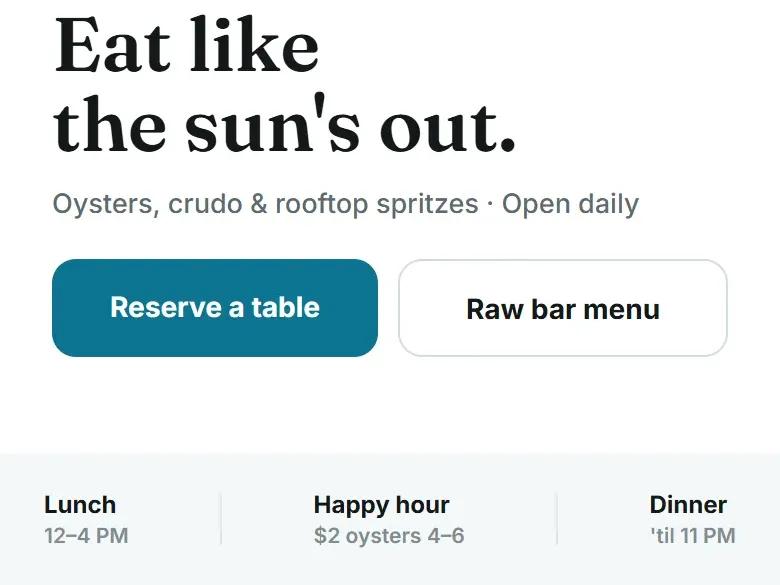
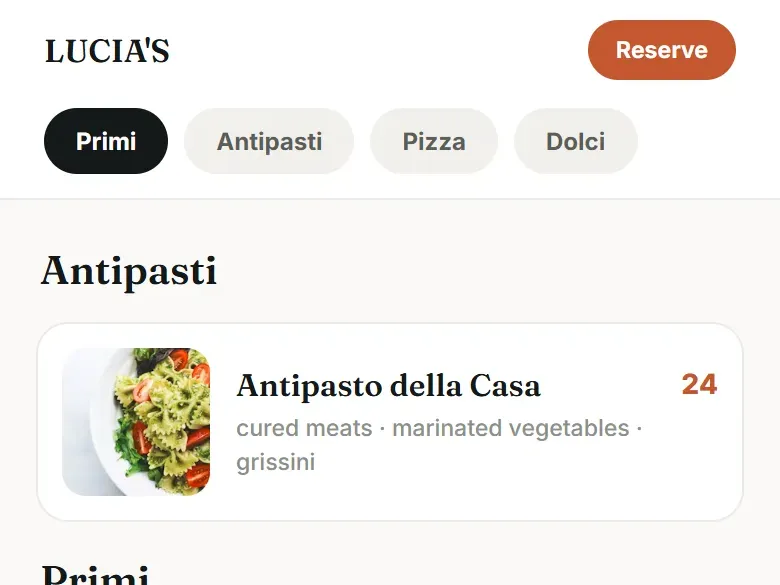
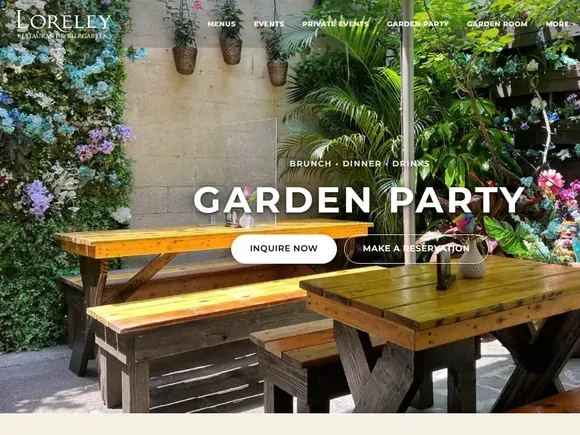
Two sample screens from Tableify demo pages with made-up restaurants, and one live room page from a Tableify site.
Questions about restaurant websites
What should be on a restaurant website?
Today's hours, the menu as text with prices, a way to book, the address and phone, and real photos. If you host parties, add a page for each room with its capacity and an inquiry form, and if you sell gift cards or orders, put both on your own site. Everything a guest needs to decide should be readable on a phone without zooming.
What do guests look for first on a restaurant website?
Usually whether you are open, what is on the menu and how to book, in about that order. Planners look for a room that fits their number, and gift buyers look for a card they can send tonight. Put the first three on the first screen of your homepage. The rest can be one tap away.
Should my restaurant's address link to Google Maps?
It should open a map with directions when a guest taps it, on whatever phone they use. Write the address as text, not only inside a map picture, so it can be read and tapped. Add a Directions button and a line about parking and the entrance. Check that the pin on your Google listing ends at your door too.
Do I need a website if I have a Google listing and social media?
Yes. Your listing and your profiles point somewhere, and your own site is the one place you control the menu, the booking and the guest's details. It is also where search engines and AI assistants read your full menu and rooms. A profile on someone else's platform can change its rules overnight; your own site cannot.
Is a PDF menu bad for a restaurant website?
As the only menu, yes. On a phone a PDF downloads instead of opening, its type is sized for paper, and search engines and assistants read it poorly or not at all. Keep the PDF for printing and put the same menu on the page as text. A menu tool that publishes both from one place saves you typing it twice.
Should my restaurant website take reservations directly?
Yes, when you can. A booking on your own site keeps the guest's details with you and avoids a fee for every cover. If you already use another system, put its booking box on your site so guests never have to leave. Check the full monthly cost either way.
What is the best website setup for a restaurant with online ordering and reservations?
One where booking, ordering and gift cards all happen on your own site, with the money landing in your own account and no cut per order or per cover. Check that the menu is text, that every flow works on a phone, and that someone keeps it current. The guide to whether Tableify fits walks through who it is built for, and the free restaurant report shows what guests find today.
Get your real score.
The checklist is your own read. See what guests and AI assistants actually find on your site, next to the places nearby.
Rather talk it through? Book a quick call